製品またはサービスを手動で更新する
自動更新に設定されている場合でも、いつでもプロダクトを手動更新できます。
Note: If you're looking to renew an expired domain, the steps are different.
- 「更新と請求」ページに移動し、「サブスクリプションを管理」を選択します。
- In the Subscriptions list, select the product and then select Extend Term.
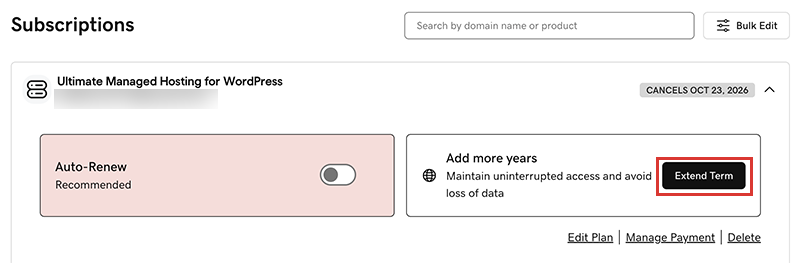
We'll take you to the Cart, where you can see the renewal price.Note: If you see Renew Now instead of Extend Plan, select Renew Now to confirm the payment method to use for the renewal. - 表示に従って更新の購入を完了してください。
Note: Products auto-renew for the same length of time as their most recent manual renewal, instead of their original registration length. This also applies to domains that are manually renewed after July 16, 2020. For example, if a domain is manually renewed after July 16, 2020 for a three-year term, it will auto-renew for the same three-year term when the time comes. For full details, see our Domain Name Registration Agreement.
関連ステップ
- 期限切れのドメインを更新する方法は次のとおりです。
- 自動更新をオンにしておけば、手動でプロダクトの更新をする必要はありません。
- Or, cancel a subscription to turn off auto-renewals.
詳細
- 支払い方法の情報を更新してください。クレジットカードの有効期限や請求先住所を変更します。