Set up or add money to my GoDaddy Cash account
If you have a paid product or service, you can set up a GoDaddy Cash account to pay for GoDaddy products.
要件:
- To start a new GoDaddy Cash account, we require a minimum deposit of USD$100. After your first transfer, the minimum deposit is USD$5.
- 「参照:顧客番号」フィールドに顧客番号を含める必要があります。顧客番号が含まれていない場合、アカウントへのクレジットは無期限に遅延します。
- APIリセラーの場合、このお客様番号はリセラーコントロールセンターのダッシュボードに表示される親アカウント番号です。
- To set up or add funds to a GoDaddy Cash account, you can either:
- Add funds with an online payment to your GoDaddy Cash account.
- Initiate a wire transfer from your bank to GoDaddy. Here's the information you need for the wire transfer:
受取銀行名:JPMorganChase Bank
銀行の住所: 270 Park Avenue、New York、NY 10017
アカウント名: GoDaddy.com、LLC
口座番号:580706823
ワイヤルーティング番号:021000021
ACHルーティング番号:124001545
スイフトコード:CHASUS33
参照:お客様番号
- After we receive the funds from your bank, the new GoDaddy Cash account appears in your Payment Methods page. If you added funds, the current balance is updated.
Required: If your current balance is more than USD$2000, you must verify your personal or business identity before you can spend the funds. Continue with the next step.
- In your Payment Methods page, select GoDaddy Cash.
- [今すぐ確認]を選択します。個人またはビジネスの身元を確認するための情報を提供するように求められます。注意:パートナーのペルソナが連邦規制への準拠を検証します。詳細については、 「ペルソナとは」を参照してください。
How do I check my GoDaddy Cash balance?
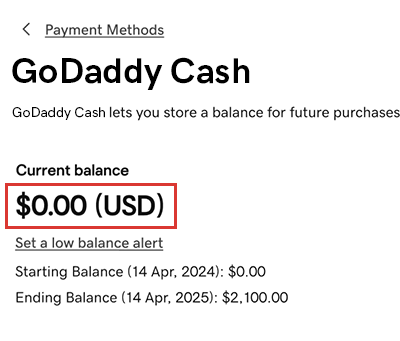
In your Payment Methods page, select GoDaddy Cash. The current balance is shown (in USD) on the GoDaddy Cash card.
関連情報
- Add another payment method to your account, like a credit card or bank account.
- Return funds from and close my GoDaddy Cash account