別のGoDaddy Conversations受信トレイを切り替える
GoDaddy Conversationsに接続しているベンチャーが複数ある場合は、異なるConversations統合受信箱を簡単に切り替えて、そのベンチャーのメッセージを読んだりできます。
Note: The GoDaddy mobile app is not available with free Conversations plans.
- Any time a customer sends a message through any of the channels you’ve connected to GoDaddy Conversations, you’ll receive a notification on your mobile phone. The notification will tell you which business it’s for and who it’s from.

- Tap the notification to be taken directly to the conversation thread in the GoDaddy mobile app, from where you can respond to the message.
- To switch to an inbox for a different venture, from your inbox, tap your business name at the top of the screen. A list of your businesses will show.
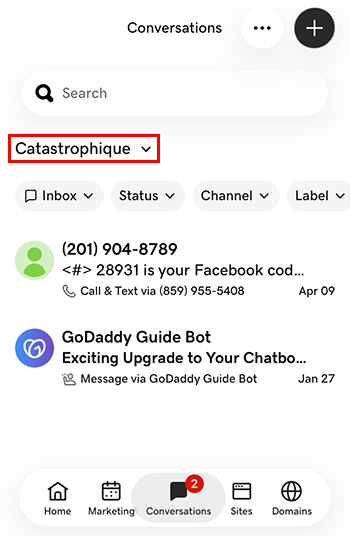
- 切り替え先のベンチャーをタップします。そのベンチャーの受信トレイに移動します。
- Webブラウザで、GoDaddyの商品ページのに移動します。
スタンドアロンバージョンのConversationsを使用している場合は、 [Conversations統合受信トレイ]を展開します。 Conversationsプランの右側にあるWeb受信箱を選択してください。
または
Websites + Marketingプランをご利用の場合は、 Websites + Marketingまでスクロールして、サイトの横にある「管理」を選択します。左側のメニューで[Conversations]を展開します。
- [受信トレイ]を選択します。アーカイブされていない会話のリストが表示されます。
- 会話スレッドに直接移動するメッセージを選択します。そこからメッセージに返信できます。
- To switch to an inbox for a different venture, on the far left of your screen, select the venture you want to switch to. You’ll be taken to the dashboard for that venture.
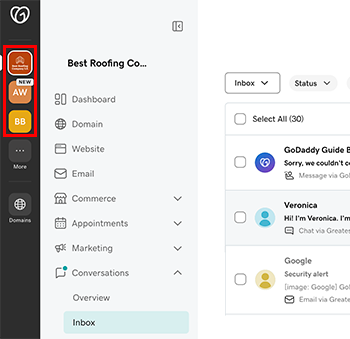
- 左側のメニューで[会話]を展開し、 [受信トレイ]を選択してそのベンチャーの受信トレイに移動します。